
Online Service 084 -360 - 65 - 51
Overall Goals of This Tutorial Series

By the end of this tutorial series, you will have created a fully functional website with multiple pages, complete with a home page, a site map, a feedback form, and an "About Us" page (and any other page you may want to create). Your site will have a professional-looking navigation menu with buttons that change colour as your mouse hovers over it, and your feedback form will allow your visitors to send you email directly from your website.
- Web Domination
- Site Architecture
- Effective Web Design
- Set Up Social Media Profiles
- Dreamweaver Overviews
- Dreamweaver Tutorials
Web Domination is ways of increasing more website pages traffic and improving customer engagement. Your website pages will load faster and provide a better user experience.
Web Designers deliver that cleanest code which is search engine spider friendly and indexes your website for the best result.
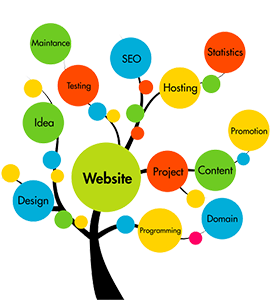
Layout of Web Domination vision, Your SEO keywords are the key words and phrases in your web content that make it possible for people to find your site via search engines. To optimise a web page for keyword group should consider doing most if not all of the following:
Using the keyword in the title of the page, URL,vaiations, Meta description, images, links back to the page. When optimising your web pages, keep in mind that keyword relevance is more important than keyword density in SEO.
Of every website your design, Web Domination will give you this combination.
-High converting website
-Regular SEO
-Local SEO
-Retargeting
-Social media marketing
-Online reviews
-Media buy
-Backlinks
-Blogs
In other words, you need to know how people are looking for the products, services or information that you offer. In order to make it easy for them to find you, keywords are one of the main elements of SEO basics.
If you’re not on the first page, you’re not in business. In today’s market the best way to bring in new clients is through the internet! The majority of consumers now search for local services, like web designers, online. If you do not have a strong positive online presence, you be lost amongst the competition.
With our help you can dominate. You optimise your website and increase your website traffic. To get you on top of the search results, “SEO” we are the experts in search engine optimisation.
Every website has some “structure.” It might be a rigorous and streamlined structure, or it may be a disorganised jumble of pages. If you are intentional and careful with your site structure, you will create a site that achieves search excellence.
It’s one of the most crucial aspects of a site’s SEO performance, but on the other hand, few webmasters and owners understand what it means to have a site structure that enhances SEO.
A good site structure means a great user experience.
When you take away the colors, the fonts, the kerning, the graphics, the images, and the white space, good site design is really about a great structure.
As you know, the more appealing your site to users, the more appealing it is to search engines, too. Google’s algorithm uses information from searchers to rank your site. If your site has poor CTRs and low dwell time, it will not perform well in the SERPs. By contrast, when a user finds a site that they like — i.e. a site with great structure — they don’t bounce and they stay longer. An accurate site structure can reduce bounce rate and improve dwell time, both of which will lead to improved rankings.
A good site structure provides your site with sitelinks.
Sitelinks are a listing format in the SERPs that show your site’s main page along with several internal links indented below. You’ve seen them before.
A good structure means better crawling.
Web crawlers like Googlebot crawl a website’s structure. Their goal is to index the content in order to return it in search results. The better your site structure, the easier the crawlers can access and index the content
Six Steps to Creating Site Structure
1. Plan out a hierarchy before you develop your website.
2. Create a URL structure that follows your navigation hierarchy.
3. Create your site navigation in HTML or CSS.
4. Use a shallow depth navigation structure.
5. Create a header that lists your main navigation pages.
6. Develop a comprehensive internal linking structure.
Site structure is a product of careful thinking, intentional design, and accurate organisation. The best time to develop a strong site stricture is before you create your site. However, if you’re redesigning your site, you can rework the design and reorganise some navigational elements to improve structural SEO.
There are a lot of things to keep in mind when optimising your site for search engines. Site structure is one of the most important, but one of the most-overlooked optimisation methods. If you have a great site structure, then great SEO will follow.
What’s the first thing your website must do for you, the most important result it would need to deliver in order to consider it a high!

In business, you only get one chance to make a good first impression, and your company’s website.
-Contact info
-Images that you represent what you do
-Clear navigation with working links
-An email sign up box
-Social media links
Create your own website!
We can show how to create a website for yourself design... if you’d like to create a website but have limited technical skills. If you need help, the first thing to do is check out our support site where we...
I do still work on my own website, but... however if your skills can’t match your vision... Then hiring a professional is must
Advantages when you design your own website!
-Saving on cost
-Personalisation and customisation
-More dynamic and update content
-Get things done on your own time
12 Tips for Becoming a Successful Web Designer
Being truly successful requires a set of characteristics and traits... some of which you might already have, some of which you might be neglecting. These are things that cannot be obtained quickly by reading books or sitting in a classroom; Rather, many of these are skills that take time and experience to cultivate. In my opinion, these are priceless tips that, when applied over time, will help you attain success in the web world.
As a web design professional, following tips will help you turn yourself into a ‘web design rockstar’:
1 Effective communication skills
2 Be able to sell yourself
3 Plan before you design
4 Evaluate your own work and get feeback
5 Be a web designer, not a graphic designer
6 Update yourself with new technology
7 Don’t neglect the web design “ Soft Skills ”
8 Gain experience
9 Be oranised
10 Have business sense
11 Be a team player
12 Keep an updated portfolio
Things you must do before a new site launch!
-Do your home work
-Hire someone to create
-Plan out a month
-Give away for your first reader
-Set up all of your Google accounts
-Set up of your social media profiles
-Build up anticipation
-Find a host that can handle your traffic
Ways to use Google places!
As you know, the more appealing your site to users, the more appealing it is to search engines, too. Google’s algorithm uses information from searchers to rank your site. If your site has poor CTRs and low dwell time, it will not perform well in the SERPs. By contrast, when a user finds a site that they like — i.e. a site with great structure — they don’t bounce and they stay longer. An accurate site structure can reduce bounce rate and improve dwell time, both of which will lead to improved rankings.
-With Google controlling more than 90% of the search traffic in the US alone
-Local content marketing & keyword... as a business own
-Change the way search engine
-To improve the SEO of every website your design
-High ranking websites for small to medium sized
-Though it will undoubtedly disorient some users and business owner
There are many great tools in Dreamweaver and it is why I and many other professionals choose to DW over other programs for creating winning web sites. Even for our beginners DW can take the edge off learning HTML and CSS. This helps you quickly scan your code as well as spot any errors. With each type of code there is a different set of highlights to help you differentiate between HTML, CSS, PHP, JavaScript and the list goes on. This is really useful if you have a lot of code on a page that is a mix of HTML and dynamic languages like PHP or ASP.

1. Code Highlighting
2. Code Suggestion
3. Code and Design View
4. Code Validation and Accessibility Checks
5. Properties Bar & Insert Image
6. Site Wide Find and Replace
7. File Manager
8. Dreamweaver Templates
9. Tabs and Connected Files
10. New Exciting Things with CS5
About this Course
Try to picture yourself sitting down with your computer, ready to start developing a fully functional web application for the first time, available online for millions to use. “Where should I even begin? How long is this going to take me? Am I making any mistakes along the way?” The questions may leave you with an uneasy feeling that you will learn many lessons the hard way.
Why Take This Course
By taking this course, you will embark on a digital adventure to build your very own application live on the web. Valuable lessons often come from experience, and it’s from this experience that Surask brings a fresh perspective to the classroom to show you how to approach building your web application in a waythat assuages the potential challenges you may face. In this course, you will learn by doing. Once you dive into the course experience, you will work on awesome projects.
This course concentrates on back-end development, but regardless if you are interested in front-end development, back-end development, or anywhere in between the stack, this course will teach you the fundamental knowledge you need break into the web development world. Are you ready to dive in?
Lesson No. 1 How to Choose Keywords for Your Site
Choosing the right keywords and phrases for your website is an important part of the process of search engine optimisation and making your site more visible to search engines and searchers alike. If you're not sure what search engine optimisation is, I invite you to read my article titled Search Engine Optimisation.
Difficulty: Average
Time Required: 20-30 minutes
Lesson No. 2 Why You Should Build A Sitemap Before Designing Your Site
A sitemap can help you clarify what your site’s goals are before you start designing or creating content. By deciding exactly what you want from your site and then mapping it out, you can ensure that every part of your website is reinforcing your goals. Then it’s possible to cut parts that aren’t directly tied to the site’s purpose before they become an integral part of the site’s architecture.
Difficulty: Average
Time Required: 20-30 minutes
Lesson No. 3 How to Optimise Your Website Messaging to Increase Conversions
Have you been to a website recently where you read every word and absorbed every image on the homepage, but you still weren’t sure what the business actually does? Those companies have spent a great deal of time developing a beautiful website and probably even more time on the product or service. But, they have overlooked a crucial element that can make the difference between a lead and a bounced visitor – the messaging.
Difficulty: Average
Time Required: 20-30 minutes
Lesson No. 4 Goals – What is the Real Purpose of Your Website
Anytime a business spends money, someone should be accountable for the return on investment. A website is no different. However, what type of return are you trying to get from building a website? What are you really trying to accomplish with your website? Three things your site should strive to do is inform, provide contact information, and entertain. Setting specific goals for your website will help you with all aspects of your website. These include, what colours, layout, images, expected revenue increase, etc.
Difficulty: Average
Time Required: 20-30 minutes
Lesson No. 5 How to Start / Create a Website: The Beginner's A-Z Guide
This tutorial shows you how to make or create a website. It is intended for the beginner and layperson, taking you step by step through the whole process from the very beginning.
The Essential Step-by-Step Guide to Making Your Own Website
1. Get Your Domain Name
2. Choose a Web Host and Sign Up for an Account
3. Designing your Web Pages
4. Testing Your Website
5. Collecting Credit Card Information, Making Money
6. Getting Your Site Noticed
Difficulty: Average
Time Required: 20-30 minutes
Lesson No. 6 Tutorials on Designing and Publishing Your First Website
• How to Design a Website with Dreamweaver CS5 (Dreamweaver CS5 Tutorial)
• How to Add Pictures and a Site Logo to Your Website Using Dreamweaver CS5
• How to Change Fonts, Text Size and Colours in Dreamweaver CS5
• How to Change the Background of Your Website in Dreamweaver CS5
• How to Make Your Images and Text into Clickable Links with Dreamweaver CS5
• How to Customise Your Website's Navigation Menu Bar with Dreamweaver CS5
• How to Manage and Auto-Update Multiple Pages on Your Website with Dreamweaver CS5's Template System
• How to Add a Feedback Form to Your Website with Dreamweaver CS5
Difficulty: Average
Time Required: 120 minutes
Lesson No. 7 General Questions/Issues Faced by New Webmasters
• What's the Difference Between a Content Management System (CMS), a Blog, a Web Editor and an Online Site Builder?
• Is It Legal to Use Any Piece of Music, Image, or Article for my Website? And Other Questions on Copyright Relevant to Webmasters
• How to Add the Copyright Symbol to Your Web Page
• Do You Need a Web Editor If You Use Your Web Host's Free Website Templates?
• How to Create Good Filenames for Your Web Pages
• Which Font Should I Use for My Web Page? Tips on Choosing Fonts for Your Website
Difficulty: Average
Time Required: 30-50 minutes
Lesson No. 8 Miscellaneous
• 3 Ways of Adding a Site Search Engine on Your Website
• Woes of a Big Site: Preparing Your Website for Growth
• Articles on Web Design
Difficulty: Average
Time Required: 20-40 minutes